SiteGround vs Bluehost for beginners
If you are trying to choose between SiteGround and Bluehost for your first website, the good news is that this does not need to be a complicated decision.
Both are well-known hosting companies. Both are built to help beginners get online. Both offer WordPress-friendly hosting, free SSL, and a beginner path into launching a site.
But they are not the same kind of choice.
In simple terms:
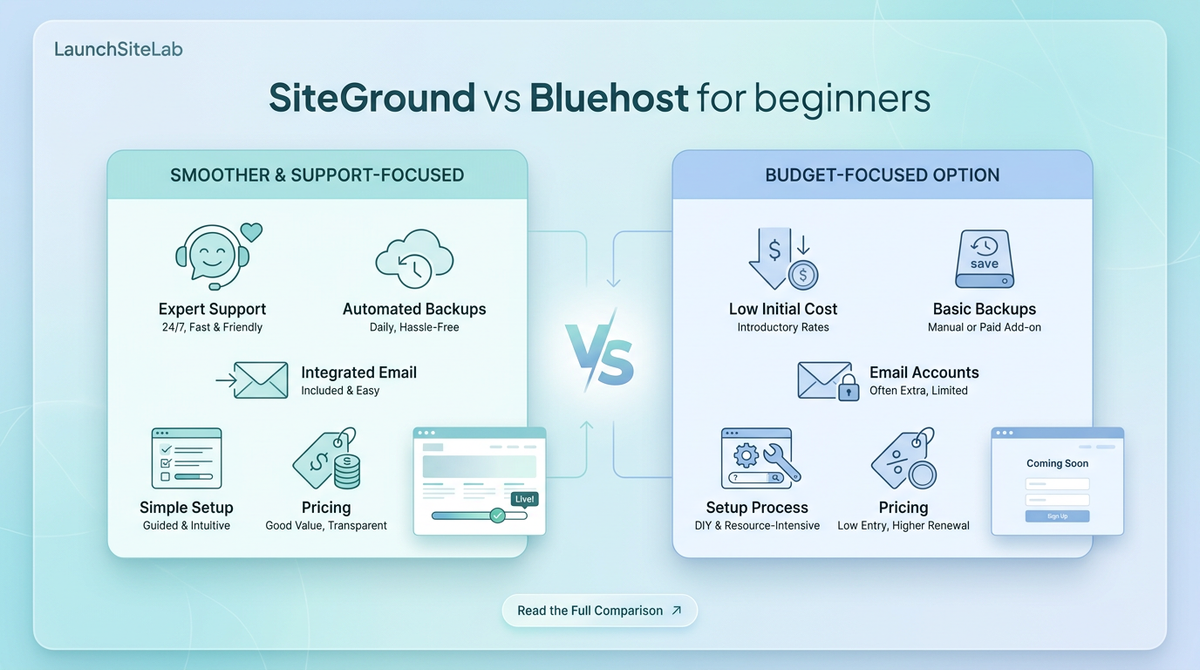
- Bluehost is easier to justify if your main goal is keeping the ongoing cost lower
- SiteGround is the better fit if you care more about support, backups, email, and a cleaner all-around beginner experience
For most LaunchSiteLab readers, I would choose SiteGround for a business website and Bluehost only if budget is the main deciding factor.
If you want a broader starting point first, read Best hosting for beginners and Best hosting for WordPress beginners.
Quick answer
Here is the practical version.
| Category | SiteGround | Bluehost | Better for most beginners |
|---|---|---|---|
| Intro price | Lower entry price on its current StartUp plan | Slightly higher current Starter entry price | SiteGround |
| Renewal price | Higher renewal pricing | Lower visible renewal pricing on entry plan | Bluehost |
| Included | Not included the same way on the starter WordPress plan | SiteGround | |
| Backups | Daily backups included | Weekly backups listed on Starter WordPress plan | SiteGround |
| Support | Strong support reputation and beginner-friendly help | 24/7 support available, but the starter plan is a bit more mixed on support experience | SiteGround |
| Best fit | One-site business owners who want fewer hassles | Budget-conscious beginners who want a lower long-term bill | Depends on priorities |
My recommendation is simple:
- choose SiteGround if you want the smoother overall beginner setup
- choose Bluehost if you mainly want to spend less over time
Pricing: SiteGround vs Bluehost
Pricing is where this comparison usually starts.
At first glance, the two can look similar. Once you look closer, they feel quite different.
SiteGround pricing
SiteGround currently shows these WordPress hosting starter prices:
- StartUp from $2.99/month
- GrowBig from $4.99/month
- GoGeek from $7.99/month
For most beginners, StartUp is the plan that matters.
It is built for one website, and that makes it easier to match to a first-time buyer.
If you want a deeper look at the pricing decision, read SiteGround pricing for beginners.
Bluehost pricing
Bluehost currently shows its Starter plan from $3.99/month on its WordPress hosting pages.
That makes Bluehost a little more expensive at the front door on the current entry plan.
But the more important detail is renewal pricing.
Bluehost’s pricing pages currently show the entry-level Starter plan renewing at a lower monthly rate than SiteGround’s StartUp plan when you look at Bluehost’s visible 36-month pricing display.
What beginners should take from this
If you only compare the first checkout price, the difference is not huge.
If you care about the longer-term monthly cost, Bluehost can look more affordable.
If you care about paying for a cleaner, more supported setup, SiteGround makes the stronger case.
That is why this is not really a "which one is cheapest" question.
It is a cost vs convenience question.
Ease of setup
Both companies are clearly built to attract beginners.
Bluehost leans hard into easy setup, AI site tools, and getting a basic WordPress site live quickly.
SiteGround also keeps setup approachable, but it tends to feel a bit more like a hosting-first product for people who want reliability and less friction after launch.
If your goal is simply to get online fast, either can work.
If your goal is to get online and feel more confident managing the site later, I would lean SiteGround.
That matters even more if your website supports a real business. In that case, also read Best website stack for a one-person business and Best hosting for small business websites.
Support and beginner experience
This is where SiteGround pulls ahead for many first-time site owners.
A beginner does not just need hosting space.
They need help when something is confusing.
That might mean:
- connecting a domain
- setting up WordPress
- fixing SSL issues
- understanding backups
- figuring out email
SiteGround generally makes a stronger case here because the overall package feels more oriented around support, guidance, and fewer rough edges.
Bluehost still offers beginner support, but the value case is a little different. It is more attractive when the lower price matters enough that you are willing to accept a more budget-led tradeoff.
Email and website stack decisions
This is one of the easiest practical differences to understand.
SiteGround includes email on its plans.
Bluehost’s starter WordPress offer currently highlights a professional email trial rather than making email feel like the same kind of built-in everyday part of the hosting package.
For some people, that will not matter.
For others, it does.
If you are launching a real business website, your email decision is part of the overall stack. That is why it helps to compare hosting with How to set up business email on your domain, Best business email for small businesses, and Google Workspace vs Zoho Mail.
Backups, updates, and the stuff beginners forget to compare
Many beginners focus on price and skip the small details until something goes wrong.
That is a mistake.
A better beginner comparison looks at:
- how often backups happen
- whether updates are managed
- whether migrations are simple
- what security basics are included
- how easy it is to get help when something breaks
SiteGround looks stronger here for the kind of reader who wants peace of mind.
Bluehost still covers the basics, but the overall offer feels more price-led.
If you are a beginner building a client-facing business site, peace of mind is usually worth something.
Which host is better for different beginner situations?
Choose SiteGround if
- you are building a business website, not just testing an idea
- you want strong support and fewer moving parts
- you care about daily backups and included email
- you are happy to pay more later for a smoother overall experience
Choose Bluehost if
- keeping the monthly cost lower matters most
- you are okay with a more budget-first tradeoff
- you want a beginner host that still gets you online fast
- you are willing to think a bit harder about what is included and what is not
Do not overbuy either one if
- you only need one simple site
- you do not yet know what advanced features you will actually use
- you are choosing based on fear instead of real requirements
That same rule applies when comparing platforms more broadly in WordPress vs Shopify vs Squarespace for beginners and Best website builder for beginners.
When SiteGround is the better beginner choice
SiteGround is the better choice when you want the host to feel more like a steady foundation.
That is especially true if your site needs to represent a business, collect leads, or act like a real part of your operations.
In that situation, the cheaper option is not always the better option.
A slightly more expensive host can still be the smarter beginner decision if it saves hassle and reduces the chances of messy setup decisions later.
When Bluehost is the better beginner choice
Bluehost is the better choice when the budget matters more than the polish.
If you are trying to keep the long-term hosting bill down, Bluehost is easier to justify.
That does not automatically make it the better overall beginner experience.
It just makes it the better fit for a different kind of buyer.
My recommendation
If a beginner asked me which host I would rather put under a small business website, I would choose SiteGround.
If that same beginner said, "I mostly care about paying less over time," I would point them toward Bluehost.
That is the cleanest way to decide.
My plain-English verdict
- Choose SiteGround for the better overall beginner experience
- Choose Bluehost for the lower-cost path
For LaunchSiteLab’s audience, that usually means SiteGround is the stronger recommendation unless price is the main constraint.
Final answer
For most beginners, SiteGround is better if you want a smoother, lower-stress hosting experience.
Bluehost is still a reasonable beginner option, but it makes the most sense when you are optimizing around cost more than support, backups, and included extras.
If you want the best fit for a first business website, I would lean SiteGround.
If you want the cheaper long-term option, I would lean Bluehost.
That is the real tradeoff.
Before you choose, also compare the wider website setup decision in Best website builder for local businesses and Best domain registrar for small businesses.